Universal Credit Self-Employed: How a Black Friday Sales Spike Can Cut Your Payments
October 15, 2026
“HMRC signed me up for Making Tax Digital” is not a fine or a demand for money. It means HMRC has put you into the Income Tax version of Making Tax Digital because your 2024 to 2025 qualifying income was over £50,000. Your first job is to sign in to HMRC online services and check what HMRC has on record.
If you sell on Amazon, eBay, Etsy, Shopify, TikTok Shop or Vinted as a sole trader, an unexpected HMRC letter or notice is unsettling, especially if you never signed up for anything. “HMRC signed me up for Making Tax Digital” is a sentence plenty of UK sellers are reading this autumn. In this article we walk through why HMRC signed you up, what to check first, how to catch up on overdue quarterly updates, and what the deadlines look like for the rest of 2026 to 2027. We do this every day for sellers through our ecommerce accounting services.
- Why HMRC signed me up for Making Tax Digital
- What to do first: check what HMRC has on record
- Catching up: your 7 November update covers six months
- Digital records for marketplace sellers
- Penalties in the first year
- Who has to use it next
- Frequently asked questions
Why HMRC signed me up for Making Tax Digital
From 6 April 2026, sole traders and landlords whose qualifying income was over £50,000 in the 2024 to 2025 tax year, and who are not exempt, must use Making Tax Digital for Income Tax for the 2026 to 2027 tax year. For people who have not signed up themselves or through an agent, HMRC started signing them up from September 2026. It is doing this in stages over the coming months, and it contacts you afterwards, either with a confirmation letter in HMRC online services or by post.
The word that catches most sellers out is “qualifying”. Qualifying income is your total income from self-employment and property before expenses, in other words your turnover, taken from your Self Assessment return for the earlier year, here 2024 to 2025. It is not your profit. Employment (PAYE) income, dividends, pensions and partnership profit shares do not count towards it.
That matters for online sellers. Plenty of sellers make modest profits on large sales volumes, because stock, postage and marketplace fees eat most of the money. We share a worked example below of a seller whose 2024 to 2025 return showed £58,000 of sales and £14,000 of profit: they are in, unless an exemption applies, because £58,000 of turnover is the figure HMRC looks at. If you are unsure how the calculation works, HMRC’s guidance on working out your qualifying income sets it out.
What to do first: check what HMRC has on record
Being signed up does not change how much tax you owe, and you still pay your full tax bill by 31 January following the end of the tax year. The first steps are about making sure HMRC holds the right information about you, and they are straightforward.
- Sign in to HMRC online services using your Self Assessment sign-in details, then select Making Tax Digital for Income Tax.
- Check and confirm the records HMRC holds about your self-employment and property income. Add any new income sources since your last return, and tell HMRC about any that have stopped.
While you are there, your HMRC online account shows any overdue quarterly updates and upcoming deadlines, so you can see exactly where you stand. If all your self-employment and property income stopped before 6 April 2026, you do not need to use Making Tax Digital for Income Tax at all: update your information in your HMRC online account or contact HMRC, though you still submit your 2025 to 2026 return. If you genuinely think you do not need to use it, contact Self Assessment general enquiries.
You can also apply for an exemption, for example if you are digitally excluded and it is not reasonable for you to use software. HMRC’s examples include where your age, a health condition or a disability stops you using a computer, tablet or smartphone, or where you cannot get internet access because of your location. It will not accept an application based only on being unfamiliar with accountancy software, having a small number of digital records, having previously filed a paper return, or the extra time or cost involved.
HMRC’s guidance for people it has signed up covers these steps in full, and it is worth reading alongside this article.
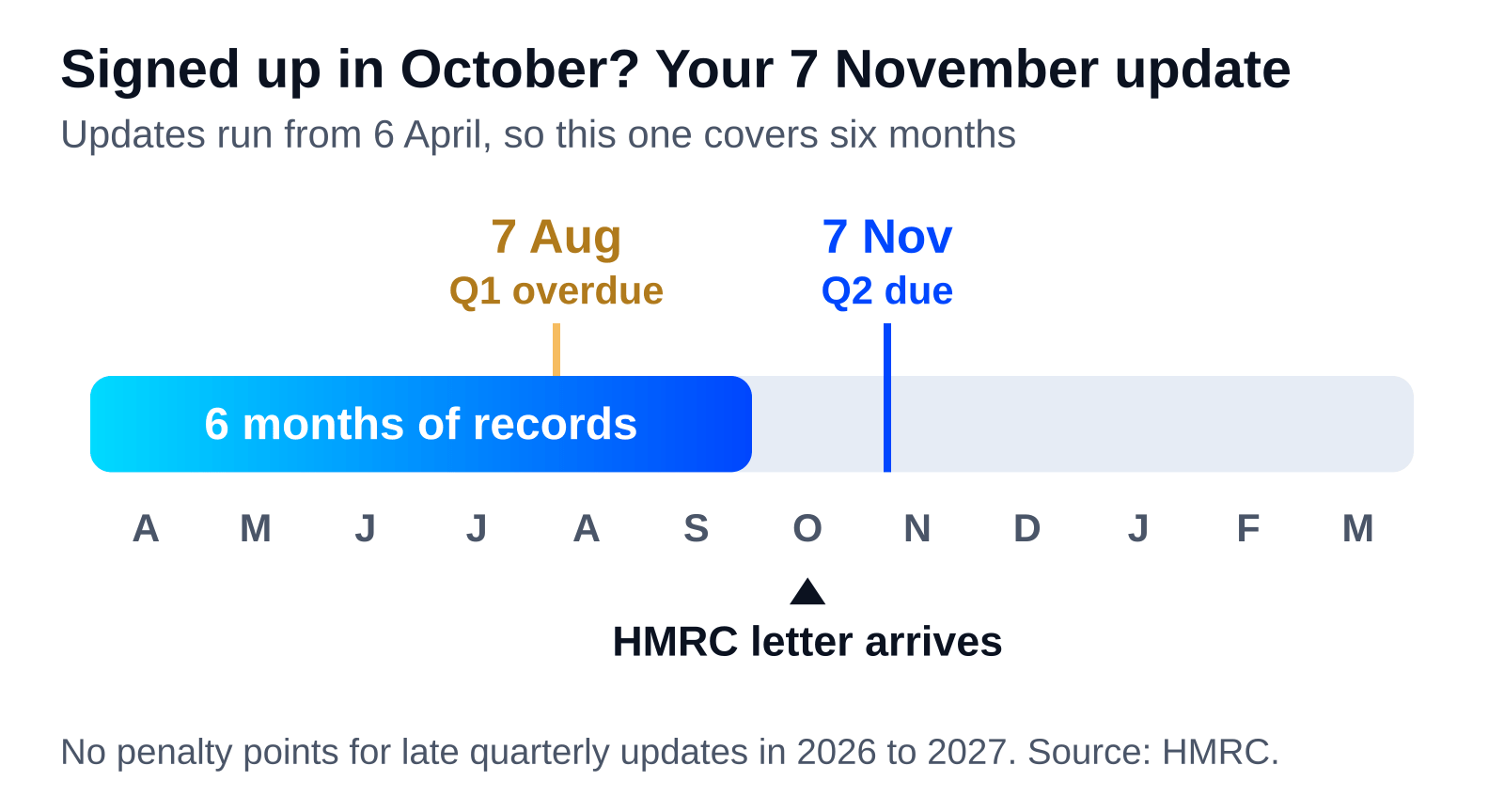
Catching up: your 7 November update covers six months
Here is the part that worries people, so let us be precise about it. A quarterly update is not a tax return. It is a summary of totals, your income and expenses for a period. Each update is cumulative: it covers everything from the start of the tax year, 6 April 2026, to the end of the update period in question, not just the previous three months.
| Update period | Covers | Deadline |
|---|---|---|
| Quarter 1 | 6 April to 5 July | 7 August 2026 |
| Quarter 2 | 6 April to 5 October | 7 November 2026 |
| Quarter 3 | 6 April to 5 January | 7 February 2027 |
| Quarter 4 | 6 April to 5 April | 7 May 2027 |
Software defaults to these standard periods. If your accounts run 1 April to 31 March, you can instead use calendar update periods ending 30 June, 30 September, 31 December and 31 March, with the same deadlines. You must select calendar periods in your software before you send your first quarterly update, and once you have sent an update you cannot change for the rest of the tax year. HMRC’s quarterly update guidance explains both options.
Now the worked example. An eBay and Etsy seller’s 2024 to 2025 return showed £58,000 of sales and £14,000 of profit. The profit is under £50,000, but qualifying income is the £58,000 turnover, so they are in from 6 April 2026, unless an exemption applies. They did not sign up, and HMRC’s letter reached their online account in October 2026.
Where do they stand? Their first update, covering 6 April to 5 July, was due by 7 August 2026, so it is already overdue and still has to be sent, not simply replaced by the next one. Their second update covers 6 April to 5 October and is due by 7 November 2026. In practice that means pulling together six months of sales, fees, refunds and stock costs into digital records, from 6 April, before 7 November. There are no penalty points for late or missed quarterly updates this tax year, but the updates still have to be made, and the final one has to be in before the 2026 to 2027 return can be filed. If HMRC signed you up for Making Tax Digital recently, this is very likely your position too.
Need this done for you? Our FCCA-chartered team catches up Making Tax Digital records and sends quarterly updates for UK ecommerce sellers every day. Book a free 30-minute call and we’ll show you what we’d do in the first 30 days.
Digital records for marketplace sellers
MTD asks for digital records, and marketplaces make that slightly fiddly. Your payouts arrive net of fees, refunds and sometimes postage, so if you just record the money that landed in your bank, your records will understate your sales and blur your costs. Your records should show gross sales and the fees separately, because qualifying income and turnover are figures before expenses, and your quarterly update sends totals by category rather than individual receipts or invoices.
Keep each platform’s sales identifiable too, so Amazon, eBay, Etsy and TikTok Shop figures stay separate and traceable. On the expense side, stock purchases, packaging and postage are all expenses to record, and they tend to be the biggest numbers for a seller. Get them in from 6 April 2026 so your cumulative quarterly updates are right the first time.
Then you need compatible software. HMRC does not provide it, and there are free and paid options. Check that whatever you choose covers all your income sources and works with your chosen update periods, and before catching up you must authorise your software and check your update period in it. Our team works with tools like Link My Books to pull marketplace data straight into bookkeeping software, so sales and fees come through by platform. For how to prepare and send the update itself, see our 7 November quarterly update guide, and for the wider picture, read what MTD means for ecommerce sole traders.
Penalties in the first year
Here is some genuine relief. HMRC will not apply penalty points for late quarterly updates in the 2026 to 2027 tax year. So if your first update is overdue, send it as soon as you can, but no points are building up against you.
Two things still bite. You need to keep digital records and send your final quarterly update for the tax year before you can submit your tax return, and it is your 2026 to 2027 return that can earn a penalty point if it is late. Your 2025 to 2026 return, due by 31 January 2027, stays under the current Self Assessment penalties. Late payment penalties also still apply, and in your first year of the new penalties you have 30 days from the payment due date before they start. From 2027 to 2028 onwards, each missed quarterly update or return deadline earns a point, and at 4 points you get a £200 penalty, with £200 for each further missed deadline. HMRC’s MTD penalties guidance has the detail.
And remember, this does not replace your old return. If you have not submitted your 2025 to 2026 tax return, you still need to submit it by 31 January 2027, and you still pay your full tax bill by 31 January following the end of the tax year.
Who has to use it next
If you are reading this before HMRC has signed you up, you may still be pulled in soon. Qualifying income over £30,000 in 2025 to 2026 means using Making Tax Digital from 6 April 2027, and over £20,000 in 2026 to 2027 means from 6 April 2028, unless an exemption applies. We have set out the full 2026 to 2028 timeline elsewhere on the site.
One boundary worth knowing: Making Tax Digital for Income Tax applies to sole traders and landlords. It does not apply to a limited company’s own profits, because company profits fall under corporation tax. If you are weighing up the two structures, our comparison of sole trader vs limited company for UK ecommerce explains the trade-offs.
Frequently asked questions
I don’t think I need Making Tax Digital. Can I refuse?
No, if you are in scope and not exempt, you cannot opt out. If you think you do not need to use it, contact Self Assessment general enquiries. You can apply for an exemption, for example if a health condition, a disability or your age stops you using a computer, tablet or smartphone, or you cannot get internet access because of your location. HMRC will not accept an application based only on being unfamiliar with software, having a small number of digital records, a past paper return, or the extra time or cost involved.
Do I still file my 2025 to 2026 tax return the old way?
Yes. If you have not submitted your 2025 to 2026 tax return, you still need to submit it by 31 January 2027, and you still pay your full tax bill by 31 January following the end of the tax year. Making Tax Digital changes how you report income during 2026 to 2027, not your existing Self Assessment obligations for the earlier year.
Does qualifying income mean my profit?
No. Qualifying income is your total income from self-employment and property before expenses, in other words your turnover, based on your Self Assessment return for the earlier tax year, so 2024 to 2025 for this first wave. It is not profit. Employment (PAYE) income, dividends, pensions and partnership profit shares do not count towards it.
I stopped selling online. Do I still have to use it?
It depends when it stopped. If all your self-employment and property income stopped before 6 April 2026, you do not need to use Making Tax Digital for Income Tax: update your information in your HMRC online account or contact HMRC, but you still submit your 2025 to 2026 return. If it all stopped on or after 6 April 2026, you still use it to send a quarterly update covering up to the date it stopped and to submit your 2026 to 2027 return, then you stop.
Can my accountant deal with it for me?
Yes. Once you have authorised an agent, your accountant can do these steps for you, signing in through their agent services account and checking each client’s income sources. You authorise us as your agent and share your sales and expense records, and we do the rest, from confirming HMRC’s records to catching up digital records and sending quarterly updates for UK ecommerce sellers.
Talk to a UK ecommerce accountant
If you’d like a hand applying any of this to your business, our FCCA-chartered team works with over 700 UK ecommerce sellers across Amazon, Shopify, eBay and TikTok Shop. Tell us about your store and we’ll show you exactly what we’d do. Book a free consultation or request a tailored quote.